
Admin Panel
Notification Re-routing
Duration
Dec 2025 - Feb 2026
Skills
Competitive Analysis, UX Design
Company
OEC
Teams
1 Designer, 2 System Analysts, 1 Front-end, 1 Back-end


My Contribution
Defined new notification rules and a user journey
Simplified the customer service configuration experience and reduced the need for constant maintenance
Improved information hierarchy and scalability as service coverage grew
Background
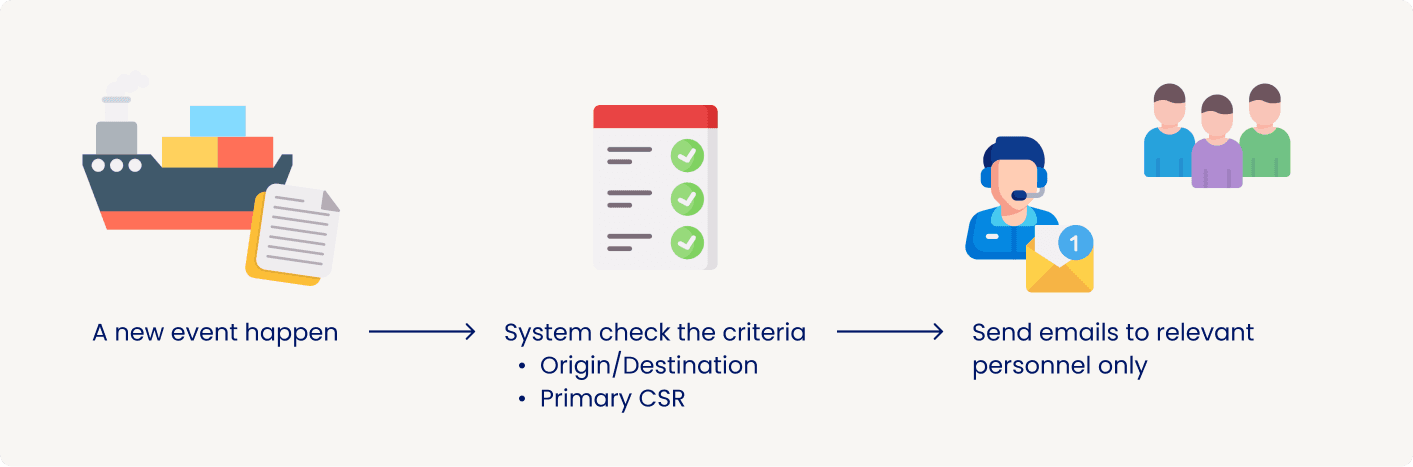
The old notification routing didn’t reflect actual service ownership or operational workflow
The Portal system sent email notifications to everyone on the operations team (OP) whenever users left comments or there were updates to booking orders. As a result, OP received excessive notifications, and important emails were easily buried among irrelevant noise.

Goal
Make sure the emails reach the right person
After the system analysts identified this issue, we developed a list of questions, and they began interviewing people from the operations teams. We then realized that, within the operations team, it was the Customer Service Representatives (CSRs) who needed to be notified of customer comments and booking updates.
Design review
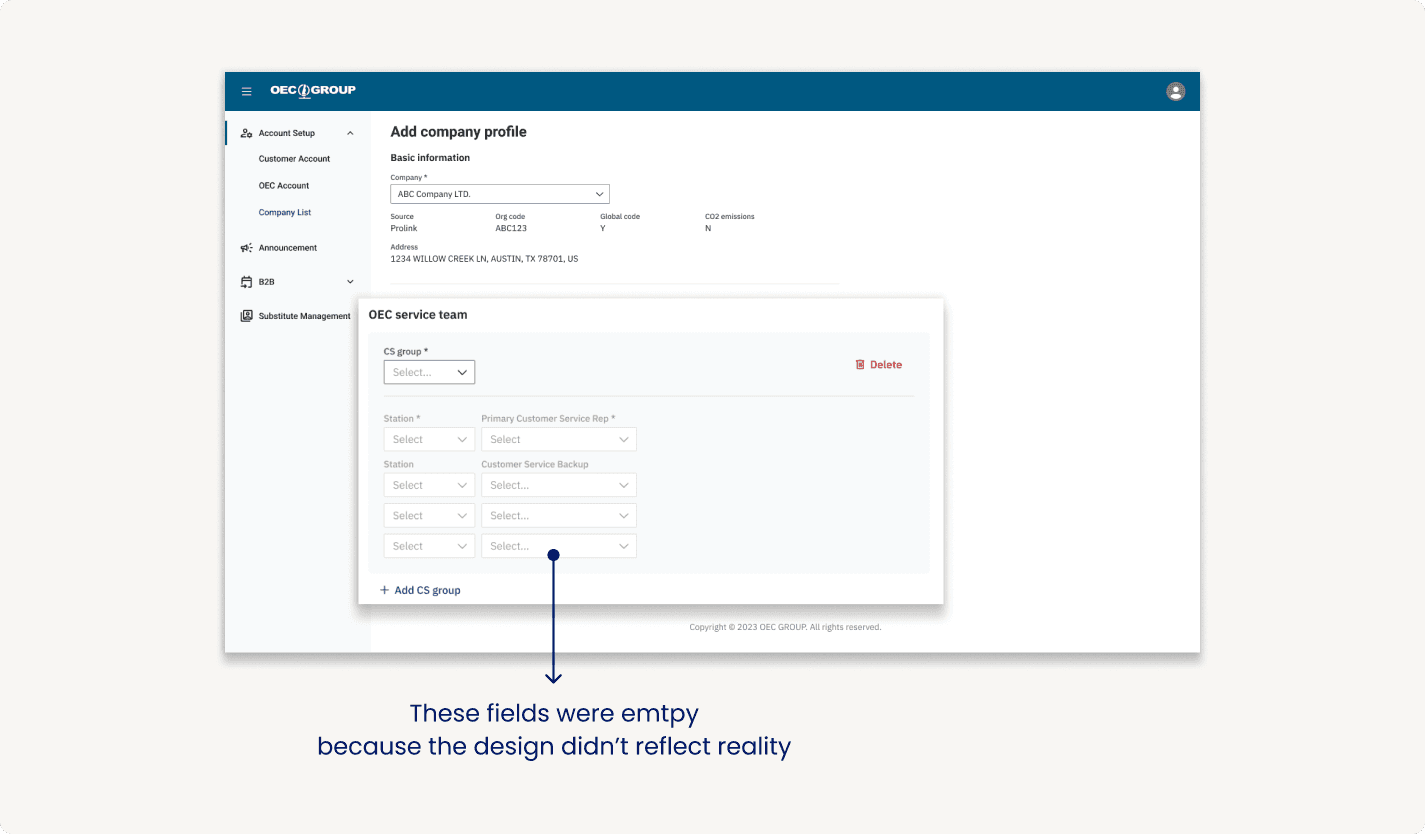
The fields were there, but CSRs were not assigned
Although we provided fields for admins to assign CSRs to companies, these fields were often left blank due to an oversimplified design that failed to align with the teams' actual structure and workflow.
Problem
Not all stations are the same
Stations from different regions came with distinct workflows and used different databases with diverse data fields. This was why a simple selector for choosing a CSR was not enough.
Some stations share a “group email”
Some CS stations operated through shared team mailboxes rather than individual customer service emails, so the notification settings needed to support both assignment models.

Backup assignments change based on availability
While the system provided a “Customer Service Backup” field, it was rarely maintained because customer service representatives didn’t have fixed backup owners. Instead, coverage was determined based on team availability at the time.
The UI didn’t support easy scale-up
When customers began shipping to a new destination, administrators had to return to the company profile and add another service assignment. The configuration workflow for adding new destinations was repetitive and lacked scalability; it required administrators to manually add a CS group and assign a representative for every new location.

Solution
Restructured the notification configuration and reduced maintenance effort

Feature 1
Designed to reflect real operational practices
Only relevant personnel would receive notifications
The major change we made was to re-route the notification logic to the primary CSR only, ensuring other operational roles no longer receive irrelevant emails.
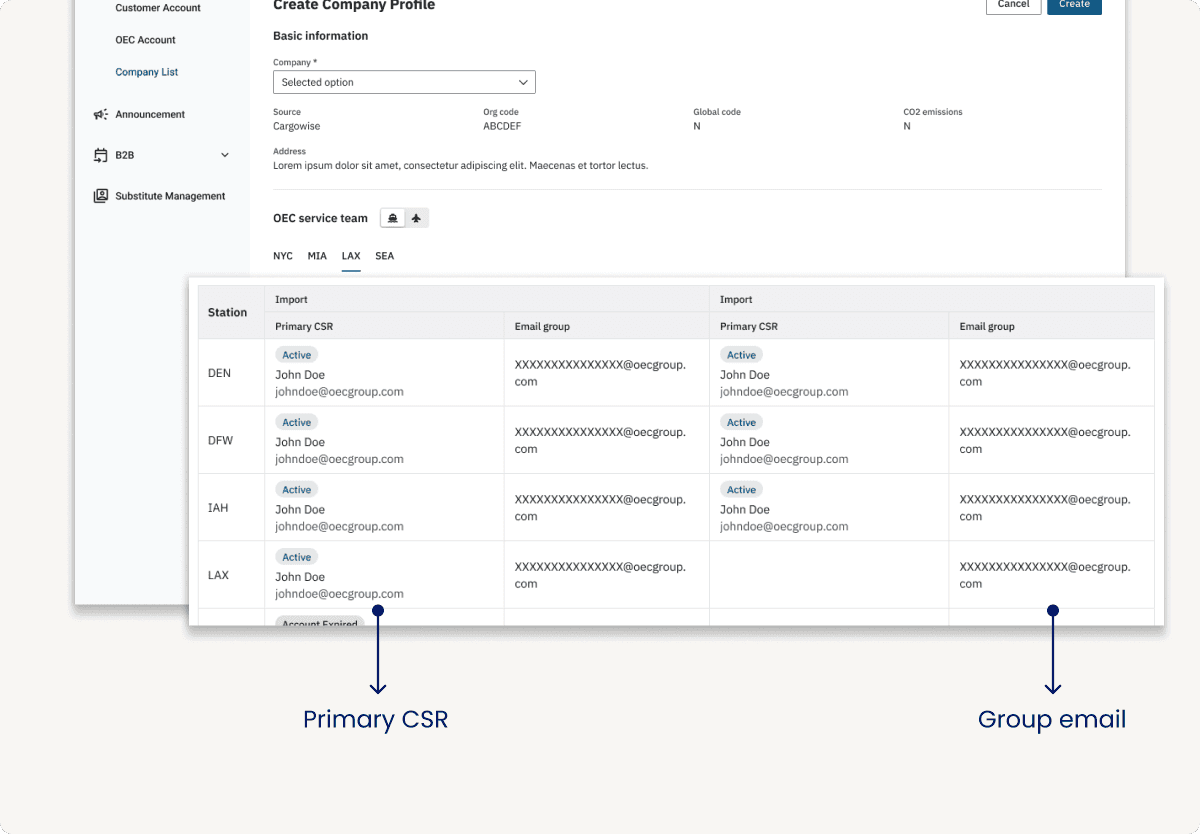
To better reflect the actual workflow, we removed the ‘Backup CSR’ fields and introduced a ‘Group Email’ field. This change not only simplified the interface but also encouraged stations to adopt shared mailboxes.
Introduced ‘Group Email’
The Group Email served as a shared mailbox where all team members could access notification emails. It served multiple purposes at once:
It aligned the Portal with how most U.S. stations already worked, where teams relied on shared mailboxes instead of assigning notifications to individual representatives.
For teams in China, it ensured notifications were visible to the entire customer service team, reducing the risk of missed emails during handoffs.

Before
After
Feature 2
Simplified long-term maintenance
Reduced repetitive steps
Instead of requiring administrators to add new stations as needed, I moved the configuration step earlier by displaying all stations upfront when administrators first created a company profile.
Administrators could still leave the contact fields blank if a station did not yet have an assigned representative, providing flexibility while eliminating the need to revisit the configuration later.
Leveraged existing ERP data
To further reduce manual maintenance, I leveraged existing data from the integrated ERP systems whenever it was available. For ERP systems that contained CSR information, we synchronized this data with the Portal and still allowed manual configuration when necessary.
By tailoring editable fields based on data availability, we reduced the workload and the administrators only needed to maintain information that couldn’t be synced automatically.

Before

After
Feature 3
A new UI for scalability
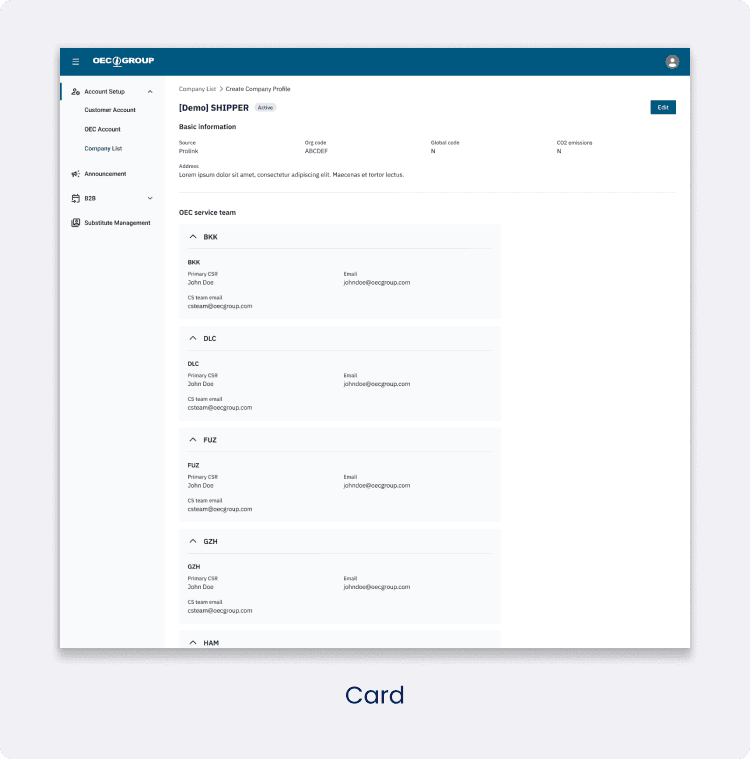
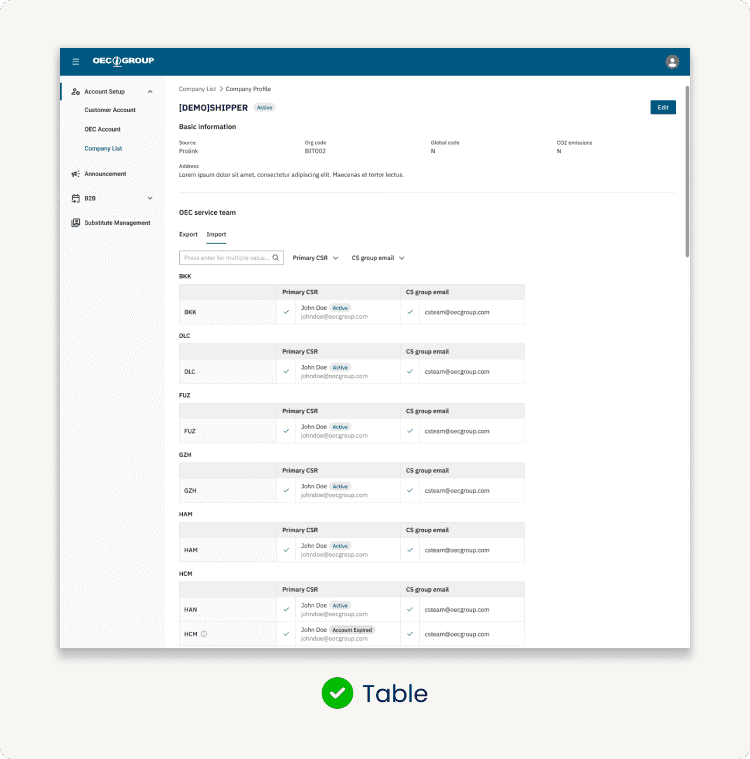
Showing every station upfront simplified data entry, but it also increased visual complexity and the amount of information shown on a single page. More importantly, it became difficult to communicate the hierarchical relationships between groups, stations, and service assignments within a flat layout.
Different layout options
I explored different options, including cards, lists, and accordions. Ultimately, I chose a table because it provided a structured way to organize and group data efficiently.

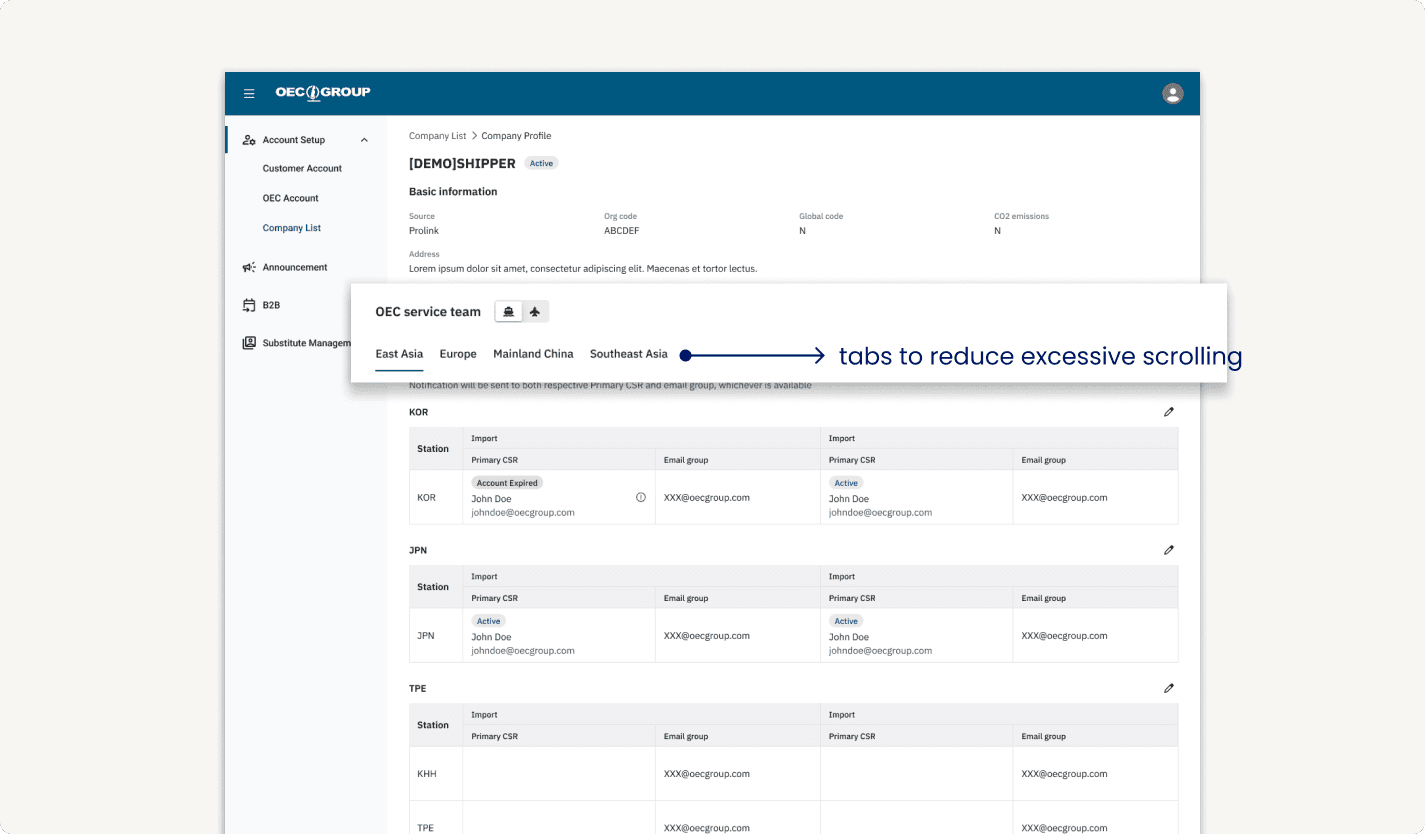
Categorized the information with tabs
Although the table made the data more organized, the page was still lengthy because it displayed 19 groups across 32 stations. After collaborating with the system analyst, we reorganized the stations by geographic location, creating a structure that better matched administrators’ mental models when they searched for a specific station.
Outcome
Handed over the new design to the system analysts
I conducted several rounds of design walkthroughs with the system analysts and adjusted the UI based on their feedback. Although they were still reviewing the overall workflow, the team highly appreciated how the design automated the process and accommodated higher data density.
Steps required to assign a primary CSR were reduced by
75%
The number of stations visible on one page increased by
3x
Take-away
Good UX starts with understanding the system
My biggest takeaway from this project was the importance of understanding the data model before designing.
As a UX designer, I was familiar with interviewing users to understand their workflows and uncover how they accomplished their tasks. However, this project introduced another layer of complexity: data flowed across multiple connected systems, and each integrated ERP stored information at different levels of detail.
Through this experience, I learned how to design a consistent user experience while working within system constraints and reducing unnecessary complexity for users.
